It is a flashlight including a flashing light.
When you launch the app, your flashlight is on.
If you touch the button, the blinking light blinks.
Touch the button to turn off the flashlight.
* Production Tools: App Inventor 2
Google Play Store :
https://play.google.com/store/apps/details?id=com.sohyang_net.flashlight
2019-02-28
2019-02-20
Flower collection puzzle
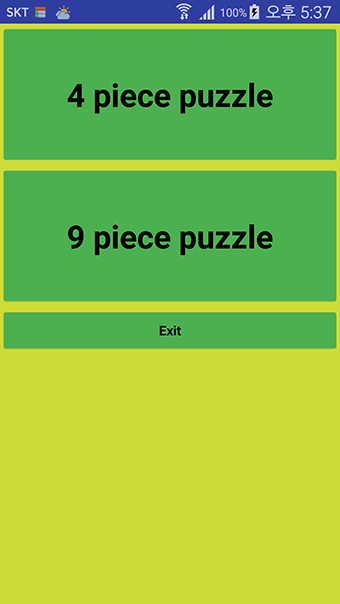
Choose 4 pieces and 9 pieces to play the puzzle game.
Look at the picture above and align the pieces below.
You can select a picture by touching the left and right buttons.
* You must have an Internet connection.
* Production Tools: App Inventor 2, html5, Javascript
Google Play Store
https://play.google.com/store/apps/details?id=com.sohyang_net.puzzle_flower
Look at the picture above and align the pieces below.
You can select a picture by touching the left and right buttons.
* You must have an Internet connection.
* Production Tools: App Inventor 2, html5, Javascript
Google Play Store
https://play.google.com/store/apps/details?id=com.sohyang_net.puzzle_flower
2019-02-16
번역기 모음 - 구글, 파파고, 카카오, Bing 번역기. Google, Papago, Kakao, Bing translate : collection
번역을 하는데 번역기를 따로따로 사용할 필요 있나요. 모두 모아서 사용해 보죠.
구글 번역기, 파파고 번역기, 카카오 번역기, Bing 번역기를 이 앱에 담았어요.
* 제작도구 : 앱인벤터
Do I need to use a translator separately to translate? Let's collect all of them.
Google translate, Papago translate, Kakao translate, Bing translate in this app.
* Production Tools: App Inventor 2
Google Play store :
https://play.google.com/store/apps/details?id=com.sohyang_net.translate
구글 번역기, 파파고 번역기, 카카오 번역기, Bing 번역기를 이 앱에 담았어요.
* 제작도구 : 앱인벤터
Do I need to use a translator separately to translate? Let's collect all of them.
Google translate, Papago translate, Kakao translate, Bing translate in this app.
* Production Tools: App Inventor 2
Google Play store :
https://play.google.com/store/apps/details?id=com.sohyang_net.translate
2019-02-15
앱인벤터로 제작한 벽돌깨기 게임입니다. brick-breaking game by ai2
앱인벤터로 제작한 벽돌깨기 게임입니다.
1. 게임은 총 4단계로 진행됩니다. 단계에 따라 장애물이 추가됩니다.
2. 스마트폰의 기울기에 따라 공의 속도가 조절됩니다.
3. 120초부터 벽돌을 깬 시간에 따라 120부터 1점까지 가산됩니다.
4. 공이 빠지면 50점이 감산됩니다.
* 제작도구 : 앱인벤터
* 제작팀 : 호야 & 달쿠아
This is a brick-breaking game for app Inventor 2.
1. The game takes 4 steps in total. Obstacles are added by following the steps.
2. The ball speed is adjusted according to the slope of the smartphone.
3. It will be added from 120 to 1 point depending on the time you break the brick from 120 seconds.
4. If the ball is dropped, 50 points will be deducted.
* Production Tools: App Inventor 2
* Production Team: Hoya & Dalkuah
Google Play store :
https://play.google.com/store/apps/details?id=com.sohyang_net.g_bricks
1. 게임은 총 4단계로 진행됩니다. 단계에 따라 장애물이 추가됩니다.
2. 스마트폰의 기울기에 따라 공의 속도가 조절됩니다.
3. 120초부터 벽돌을 깬 시간에 따라 120부터 1점까지 가산됩니다.
4. 공이 빠지면 50점이 감산됩니다.
* 제작도구 : 앱인벤터
* 제작팀 : 호야 & 달쿠아
This is a brick-breaking game for app Inventor 2.
1. The game takes 4 steps in total. Obstacles are added by following the steps.
2. The ball speed is adjusted according to the slope of the smartphone.
3. It will be added from 120 to 1 point depending on the time you break the brick from 120 seconds.
4. If the ball is dropped, 50 points will be deducted.
* Production Tools: App Inventor 2
* Production Team: Hoya & Dalkuah
Google Play store :
https://play.google.com/store/apps/details?id=com.sohyang_net.g_bricks
Catch the mole. Mole catching. Catching the mole to roll the ball.
Let's get the mole~
1. Mole catching: It is a 60 second game to catch by touching the mole.
2. Ball Rolling: A 60-second game that tilts your smartphone and rolls the ball to catch the mole.
3. When you enter the ranking view at the time of game over, it is automatically recorded in the ranking.
* Production Tools: App Inventor
* Production Team: Hoya & Dalkuah
Google Play store :
https://play.google.com/store/apps/details?id=com.sohyang_net.g_mole_en
1. Mole catching: It is a 60 second game to catch by touching the mole.
2. Ball Rolling: A 60-second game that tilts your smartphone and rolls the ball to catch the mole.
3. When you enter the ranking view at the time of game over, it is automatically recorded in the ranking.
* Production Tools: App Inventor
* Production Team: Hoya & Dalkuah
Google Play store :
https://play.google.com/store/apps/details?id=com.sohyang_net.g_mole_en
Good Clock - Quiet Silent Clock, Compass, Timer (-), Timer (+), Alarm.
Good Clock - Quiet Silent Analog Clock, Quiet Silent Digital Clock, Compass, Timer (-), Timer (+), Alarm.
1. Analog clock: Quiet silent clock. Touch to change the screen in 4 modes.
2. Digital clock: Quiet silent clock.
3. Compass: Quiet silent compass.
4. Timer (-): Sets the time and activates the timer.
5. Timer (+): The number increases from 1 second.
6. Alarm: You can set alarm in 10 minute, 30 minute, 1 hour in real time.
Timers and alarms support bell, voice, and vibration.
Timers and alarms can be set in 10 minute, 30 minute, 1 hour.
* Production Tools: App Inventor 2

1. Analog clock: Quiet silent clock. Touch to change the screen in 4 modes.
2. Digital clock: Quiet silent clock.
3. Compass: Quiet silent compass.
4. Timer (-): Sets the time and activates the timer.
5. Timer (+): The number increases from 1 second.
6. Alarm: You can set alarm in 10 minute, 30 minute, 1 hour in real time.
Timers and alarms support bell, voice, and vibration.
Timers and alarms can be set in 10 minute, 30 minute, 1 hour.
* Production Tools: App Inventor 2
Google Play store :

피드 구독하기:
덧글 (Atom)